
In today’s digital world, cloud storage apps have become an essential part of our daily lives. Whether you want to back up important files, store photos and videos, or access documents from anywhere, cloud storage solutions make everything easy and secure. With so many options available, choosing the best cloud storage app can be confusing.
In this detailed guide, we review the best cloud storage apps, compare their features, storage limits, security, and usability to help you find the perfect option for your needs.
What Is a Cloud Storage App?
A cloud storage app allows users to store files such as photos, videos, documents, and backups on remote servers instead of local devices. These apps sync data across multiple devices, ensuring your files are always accessible, safe, and updated.
Key Benefits of Cloud Storage Apps
- Access files anytime, anywhere
- Automatic backup and sync
- High-level data security
- Saves local device storage
- Easy file sharing
1. Google Drive – Best Overall Cloud Storage App
Google Drive is one of the most popular cloud storage apps worldwide. It is ideal for students, professionals, and businesses.
Features:
- 15GB free storage
- Seamless integration with Google Docs, Sheets, and Slides
- Strong security and encryption
- Cross-platform support (Android, iOS, Windows, macOS)
Pros:
- User-friendly interface
- Excellent collaboration tools
- Reliable performance
Cons:
- Shared storage across Google services
- Paid plans required for large storage needs
Best For: Students, professionals, and Google ecosystem users.
2. Dropbox – Best for File Syncing
Dropbox is known for its fast and reliable file syncing capabilities.
Features:
- 2GB free storage
- Smart Sync feature
- Advanced file recovery
- Third-party app integrations
Pros:
- Extremely fast syncing
- Simple and clean UI
- Excellent version history
Cons:
- Limited free storage
- Higher pricing compared to competitors
Best For: Professionals who need fast and reliable syncing.
3. OneDrive – Best for Windows Users
Microsoft OneDrive is deeply integrated with Windows and Microsoft Office.
Features:
- 5GB free storage
- Office 365 integration
- Strong file sharing options
- Offline access
Pros:
- Excellent for Windows users
- Affordable paid plans
- Built-in ransomware detection
Cons:
- Interface can feel cluttered
- Limited free storage
Best For: Windows and Microsoft Office users.
4. iCloud – Best for Apple Users
iCloud is Apple’s official cloud storage solution, designed for iPhone, iPad, and Mac users.
Features:
- 5GB free storage
- Automatic photo and device backup
- Seamless Apple ecosystem integration
- End-to-end encryption
Pros:
- Smooth background syncing
- Easy to use
- Strong privacy protection
Cons:
- Limited free storage
- Not ideal for non-Apple devices
Best For: Apple ecosystem users.
5. MEGA – Best for Privacy and Free Storage
MEGA stands out for its strong security and generous free storage.
Features:
- 20GB free storage
- End-to-end encryption
- Secure file sharing
- Cross-platform support
Pros:
- High privacy standards
- Large free storage
- Secure file transfers
Cons:
- Slower speeds at times
- Bandwidth limits on free accounts
Best For: Privacy-focused users.
6. pCloud – Best Lifetime Cloud Storage Option
pCloud offers a unique lifetime storage plan, making it cost-effective in the long run.
Features:
- 10GB free storage
- Lifetime payment plans
- Built-in media player
- Optional client-side encryption
Pros:
- One-time payment option
- Strong security
- Easy file sharing
Cons:
- Encryption costs extra
- Fewer integrations
Best For: Long-term users who want lifetime storage.
7. Box – Best for Business Use
Box is designed mainly for businesses and teams.
Features:
- 10GB free storage
- Advanced admin controls
- Workflow automation
- Enterprise-level security
Pros:
- Excellent collaboration tools
- High compliance standards
- Scalable plans
Cons:
- Not beginner-friendly
- Limited features for personal use
Best For: Businesses and enterprises.
Comparison Table (Quick Overview)
| App Name | Free Storage | Best For |
|---|---|---|
| Google Drive | 15GB | Overall use |
| Dropbox | 2GB | Fast syncing |
| OneDrive | 5GB | Windows users |
| iCloud | 5GB | Apple users |
| MEGA | 20GB | Privacy |
| pCloud | 10GB | Lifetime plans |
| Box | 10GB | Business |
How to Choose the Best Cloud Storage App
Before selecting a cloud storage app, consider the following factors:
- Storage Needs: How much space do you need?
- Security: End-to-end encryption and privacy policies
- Device Compatibility: Android, iOS, Windows, macOS
- Budget: Free vs paid plans
- Sharing & Collaboration: Team features and permissions
Final Verdict
Choosing the best cloud storage app depends on your personal or professional needs.
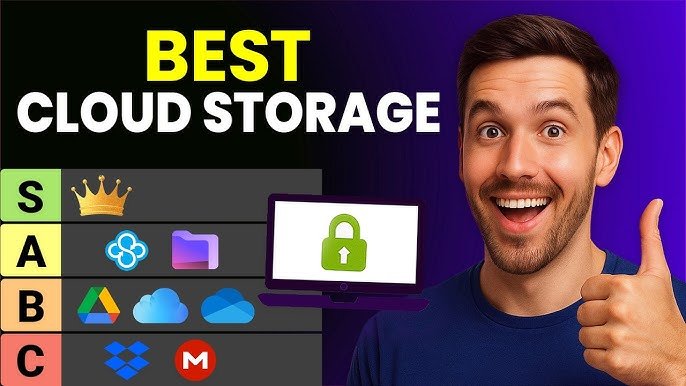
- Google Drive is the best all-rounder
- MEGA is perfect for privacy lovers
- OneDrive and iCloud are ideal for ecosystem users
- pCloud offers great long-term value
Cloud storage apps not only protect your data but also improve productivity and accessibility.
FAQs – Cloud Storage Apps
Q1: Are cloud storage apps safe?
Yes, most top apps use strong encryption and security protocols.
Q2: Which cloud storage app gives the most free space?
MEGA offers up to 20GB free storage.
Q3: Can I use multiple cloud storage apps?
Yes, many users combine apps to maximize free storage.